
Download Interior Amore – AI‑Powered Interior Design Tool
Overview
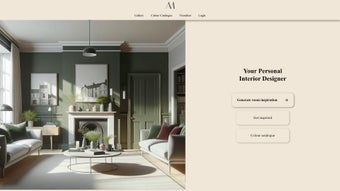
Interior Amore is a cutting‑edge web application that blends artificial intelligence with interior‑design expertise to give users a truly personalized creative experience. Whether you are a homeowner planning a single‑room refresh or a professional designer managing multiple projects, the platform offers a seamless blend of inspiration, practical tools, and community feedback. After logging in, users are greeted with a dashboard that curates design ideas based on their style preferences, room dimensions, and budget constraints.
The heart of Interior Amore lies in its AI‑driven visualiser, which lets you upload a photo of any space and instantly overlay furniture, colour schemes, textures, and lighting options. This “what‑if” capability reduces the guesswork that often stalls renovation projects and empowers you to make confident decisions before any physical work begins. In addition to the visualiser, the app hosts a massive gallery of professionally designed rooms, a searchable colour catalogue featuring paint manufacturers worldwide, and a rating system that lets the community vote on the most successful designs.
By aggregating these features into a single, secure, browser‑based tool, Interior Amore positions itself as a versatile resource for anyone looking to enhance interior spaces without the steep learning curve of traditional design software. The platform also integrates AI‑powered trend forecasting, automatically suggesting emerging colour palettes and material finishes that align with seasonal market data. All user data is encrypted both in transit and at rest, ensuring that personal project files, mood boards, and payment information remain private.
With regular updates driven by real‑world usage patterns, Interior Amore continuously improves its rendering accuracy, expands its furniture library, and refines its recommendation engine, making it a future‑proof solution for both hobbyists and design firms.
Key Features That Set Interior Amore Apart
Interior Amore’s feature set is built around the idea of “design in seconds.” The AI engine analyses uploaded images, detects architectural elements, and suggests layout improvements while you watch. Below is a detailed look at what makes this tool stand out from other design apps on the market.
- AI‑Powered Visualiser: Upload a photo of your room, and the algorithm generates realistic renderings with selectable furniture, décor, and lighting options.
- Vast Design Gallery: Browse thousands of curated interior styles, from minimalist Scandinavian to bold Art‑Deco, each tagged with room type, colour palette, and budget range.
- Comprehensive Colour Catalogue: Access an extensive database of paint colours, including manufacturer swatches, RGB/HEX codes, and recommended pairings.
- Personalised Dashboard: After signing in, the platform tailors content based on your saved projects, favourite styles, and previous interactions.
- Community Review & Rating System: Share your own designs, read feedback, and up‑vote the most inspiring ideas to help others discover proven solutions.
- Alternative Tool Directory: A curated list of complementary design software and hardware (e.g., AR‑headsets, 3‑D printers) for users who want to expand their toolkit.
- Secure Cloud Storage: All project files, mood boards, and visualiser snapshots are saved securely in the cloud, accessible from any device.
- Regular Updates & AI Training: The backend continuously learns from user interactions, ensuring fresh design trends and improved rendering accuracy.
- Trend Forecast Panel: AI analyses global design publications and social media to predict upcoming colour and material trends, helping you stay ahead of the curve.
- Collaboration Suite: Real‑time co‑editing, comment threads, and version history make it easy for teams to work together on the same project without confusion.
Installation & Usage Instructions
Getting Started – No Download Required
Interior Amore is a web‑based application, which means you don’t need to install bulky software on your computer. Simply open a modern browser (Chrome, Edge, Firefox, Safari) and navigate to https://interioramore.com. The site uses HTTPS encryption, guaranteeing that your data remains private and secure.
Step‑by‑Step Account Creation
- Click the “Sign Up” button on the homepage.
- Enter your email address, create a strong password, and optionally connect a Google or Apple ID for single‑sign‑on convenience.
- Verify your email via the confirmation link sent to your inbox.
- Log in and complete the onboarding questionnaire that asks about your design preferences, room dimensions, and budget range.
Creating Your First Project
After logging in, you’ll land on the personalized dashboard. Click “New Project,” give it a name (e.g., “Living Room Refresh”), and upload a high‑resolution photo of the space you want to redesign. The AI visualiser will analyze the image, detect walls, windows, and major furniture, and present a 3‑D overlay. From there you can:
- Select a colour palette from the catalogue and apply it instantly to walls and ceilings.
- Drag‑and‑drop furniture items from the library onto the floor plan, adjusting scale and orientation.
- Toggle lighting conditions (daylight, evening, warm indoor) to see how textures behave under different illumination.
- Save snapshots at any stage, share a link with collaborators, or export a high‑resolution rendering for client presentations.
Advanced Tips for Power Users
While Interior Amore is intuitive for beginners, seasoned designers can leverage hidden features: use the “Custom Upload” option to import your own furniture models, enable “Batch Colour Apply” to recolour multiple rooms simultaneously, and activate the “Trend Forecast” panel to see which colours and materials are projected to dominate the market next season. The platform also supports API integration, allowing firms to sync project data with their existing CRM or project‑management tools. If you encounter performance hiccups, clearing your browser cache, disabling unnecessary extensions, or switching to a wired internet connection can dramatically improve rendering speed. For mobile users, the responsive interface scales gracefully on tablets and smartphones, and the same project data is instantly available across devices thanks to cloud synchronization.
Compatibility, Pros & Cons, and Community Insight
Because Interior Amore runs entirely in the browser, it is compatible with Windows, macOS, Linux, Android, and iOS devices. Any system that supports a recent version of Chrome, Edge, Firefox, or Safari can access the full feature set without performance degradation.
Pros
- Zero‑install, instantly accessible from any device.
- AI visualiser delivers photorealistic previews in seconds.
- Extensive colour catalogue with manufacturer data.
- Community‑driven rating system encourages idea sharing.
- Secure cloud storage protects your projects.
- Regular updates keep design trends current.
- Real‑time collaboration reduces hand‑off errors.
- Trend forecasting helps you stay ahead of market movements.
Cons
- Requires a stable internet connection for full functionality.
- Advanced custom model uploads are limited to premium subscribers.
- Some high‑resolution renders may take longer on low‑end devices.
- While the core tool is free, certain premium colour palettes and furniture packs are behind a paywall.
- API access is currently restricted to enterprise‑level accounts.
Community FAQ
Is Interior Amore really free to use?
Yes, the core visualiser, design gallery, and colour catalogue are completely free. Premium features—such as custom 3‑D model uploads, exclusive furniture collections, and advanced analytics—are available through a monthly subscription.
Can I export my designs for use in other software?
Absolutely. Rendered images can be downloaded as high‑resolution PNG or JPEG files. For deeper integration, premium users can export a .glTF file that can be imported into SketchUp, Blender, or other 3‑D modeling tools.
How secure is my data on the cloud?
Interior Amore uses AES‑256 encryption for data at rest and TLS 1.3 for data in transit. Your projects are stored on ISO‑27001‑certified servers, and you have full control over sharing permissions.
Do I need a powerful computer to run the visualiser?
The visualiser is optimized for modern browsers and runs smoothly on mid‑range laptops and tablets. However, extremely high‑resolution photos or complex multi‑room projects may benefit from a device with at least 8 GB RAM and a recent GPU.
Can I collaborate with a team in real time?
Yes. By sharing a project link, teammates can view and edit the design simultaneously. Changes appear instantly, and a revision history is kept for each session.
Conclusion & Call‑to‑Action
Interior Amore stands out as a powerful, AI‑driven solution that democratizes interior design for both novices and professionals. Its web‑first approach eliminates the friction of downloads and updates, while the visualiser and colour catalogue provide instant, photorealistic feedback that speeds up decision‑making. By fostering a vibrant community of reviewers and offering a clear upgrade path for advanced users, the platform balances accessibility with depth.
The addition of trend forecasting, real‑time collaboration, and secure cloud storage makes it a future‑ready tool that can grow alongside your design ambitions. Whether you’re planning a single‑room makeover, preparing a client presentation, or managing a multi‑project portfolio, Interior Amore gives you the confidence to experiment, iterate, and finalize designs without ever leaving your browser. If you’re ready to explore design possibilities without the steep learning curve of traditional CAD tools, sign up for a free account today and start visualising your dream space in minutes.
Take advantage of the free core features, test the premium trial, and see how AI can transform the way you think about interior aesthetics.
Rating: 4.5/5 – The AI visualiser and community features earn high marks, while occasional latency on low‑end devices prevents a perfect score.



.png)



